




Easy 3D video surveillance design software for professional proposals and projects

Version 2026 for Windows 11, 10, 8 and 7 SP1 is available [July 2026, What's new? | Upgrade | Trial | Mac OS users]
With the IP Video System Design Tool you can:
- Increase efficiency of security systems while lowering costs and finding the best camera locations.
- Calculate precise camera lens and sensors requirements easily to achieve desired pixel density (PPM/PPF).
- Visually show DORI zones (Detection, Observation, Recognition and Identification) of each camera on a site plan, based on pixel density specified by IEC/EN 62676-4:2015 and 62676-4:2025 standards.
- Import floor plans in JPEG, PNG, PDF, TIFF format or AutoCAD DWG drawings (Pro/Expert versions) to jump start your designs.
- Plan cable paths and calculate cable lengths.
- Vendor-agnostic Database of 23,000+ camera models, with pre-configured parameters for easy designing. Instant camera swap.
- Maximum data security (with the Offline Version). Operates fully offline with no internet access. All designs and data remain within your infrastructure with zero external transfer. No cloud, no tracking, no data collection.
- Estimate network bandwidth and storage needs for video archive configuration.
- Export designs to include with proposals or work orders in PDF, DOC, ODT, XLS, DWG/DXF(Pro/Expert) formats.
This software offers CAD-like design functionality without a steep learning curve. The Design Tool allows for anything from simple overhead views, to complex 3D models to help explore exactly what the system will capture once installed. Designers consistently tell us how this tool helps them better educate users of the system and set proper expectations for performance, as well as reduce callbacks or move/add/change orders from frustrated customers.
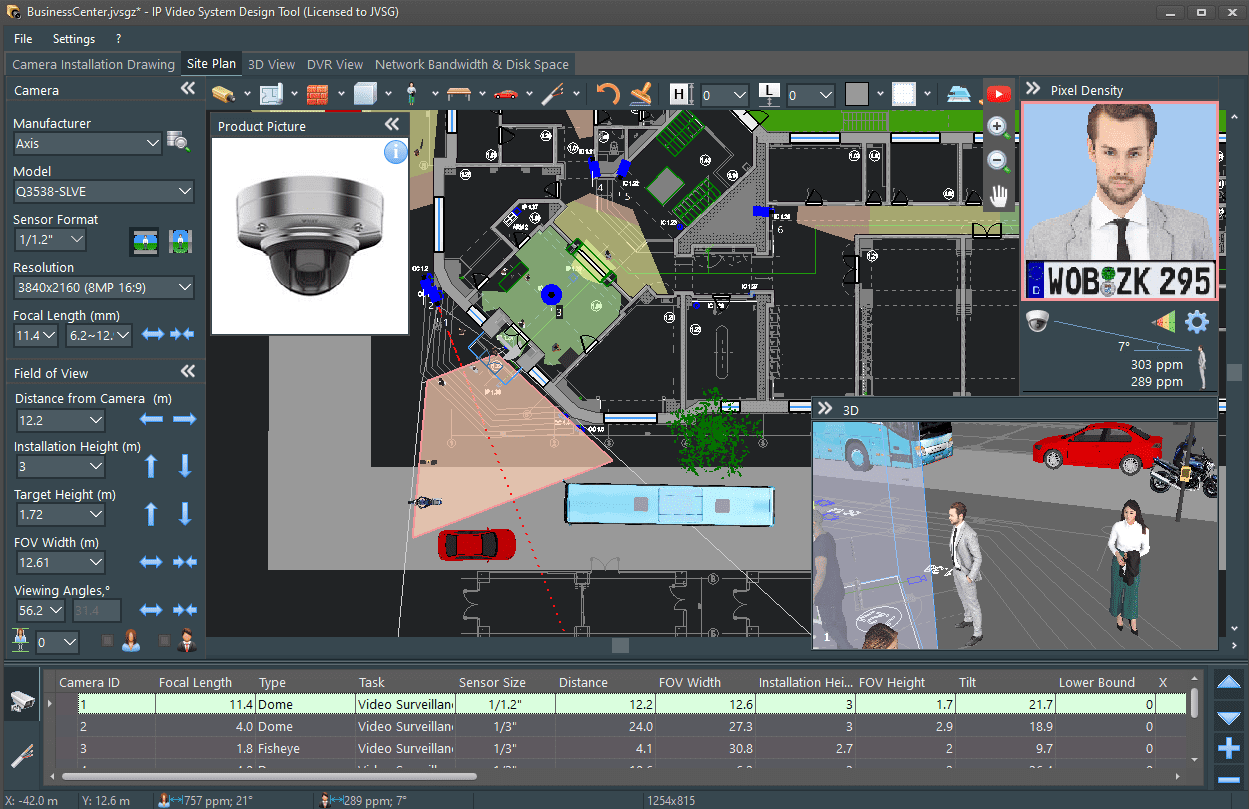
This software helps planning security camera placement. IP Video System Design Tool includes CCTV storage, bandwidth and field of view calculators, lens focal length and pixel density calculator and many other CCTV tools, so users can design a video surveillance system quickly, easily and professionally.
Security camera placement tool
How does it work?
Part 1: Camera installation drawing, field of view, lens focal length and pixel density

Part 2: Pixel density, camera zones, identification, recognition, detection and EN 62676-4: 2015

Part 3: Working with site plan, adding obstacles and 3D models

Part 4: 3D View Simulation, DVR View

- See screen shots:
- Article 0: How to design video surveillance systems to win by Brian Karas
- Article 1: Video Surveillance in Retail Store
- Article 2: Installing Security Cameras in Corridors
- Article 3: Identification in CCTV
- Article 4: Perimeter video surveillance system
- Video tutorials: How to quickly and easily design video surveillance systems, Identification/recognition camera zones and EN62676-4 (EN 50132-7), Working with floor plans.


Realistic 3D models help create visually attractive proposals and video surveillance projects that truly stand out.

User 3D models import function (Pro version) allows the import of free 3D models from Sketchup 3D Warehouse as well as other 3D software that supports open Collada or OBJ formats.
What people say about this software?
-”If you Google “lens calculator”, a number will come up for you to use or you can choose the IP Video System Design Tool, a small undiscovered gem.
Pages 234, 235, “Digital Video Surveillance & Security” book, Second Edition, ISBN-10: 0124200427 by Anthony C. Caputo, 2014
- “JVSG’s IP Video System Design Tool is a must have for any system designer. There is no need for guesswork anymore. Using this excellent feature-rich software, you can design a detailed and accurate system from the comfort of your office. No more blind spots or miscalculated lens sizes. It truly is a must have!‘
Stephen Cronshaw  , Sales Engineer at Axis Communications
- “I have been using the JVSG IP CCTV designing software since 2010. Buying this software has been the best business investment! The software is not complicated to use and is very user-friendly. Besides the calculators, the 3D picture is my favorite software feature. I believe the JVSG IP CCTV software is the best design tool on the market and I highly recommend this product to video system designers.”
Dario Dzinic , BA, CAS, NCSO, P.GSC, Interior Safety Network Limited, Canada
- “I started to design video surveillance systems relatively recently. Shortly after, I realized that I needed something to better evaluate the planned design. Vendors and the web give plenty of tools, but I was surprised no one could show you what you would really get on the operator screen and an estimation of the effectiveness of the camera placement. JVSG’s IP Design Tool does all these things in a very intuitive way.”
Marco Desiati , Sales & Design Engineer at Axians, Italy
- “I love IP Video System Design Tool. It allows me to provide a sophisticated CCTV camera layout to prospective customers for many applications such as Video Analytics, General Surveillance, LPR and more. The fact that I can calculate pixels per foot, the object percentage of FOV, height, angle, object distance and other parameters is amazing.”
Greg Skarvelis , Director of Sales Enablement
Verint Video Intelligence Systems, www.verint.com, US
PDF Presentation: CCTV Design Tool: IP Video System Design Tool
White Paper: From CCTV Pre-visualization of Design to Fruition – by Jay C. McCormick PSP, CAHSO, ESCO Communications
Case Study: LENSEC uses IP Video System Design Tool by JVSG to easily design large scale surveillance systems and mutually understand client requirements in a better way through 3D visual models - Jamie Bradford , Director of Solutions, LENSEC
Who uses our software?
Over 15,000 companies design video surveillance systems with the help of IP Video System Design Tool.
ADT, AECOM, ARUP, Anixter, ABUS, Arecont Vision, AXIS, Bosch, Dahua, Dallmeier, Fuji, G4S, Hanwha Wisenet, Hikvision, Honeywell, Lensec, Mott MacDonald, i-PRO, Securiton, Shell, Siemens, Sony, Stantec, STV Inc, Verint, ViS Security Solutions, VINCI, WSP Group, Tyco, NEC, Nice, Nucor Steel, Amtrak, Deutsche Bahn Kommunikationstechnik, SNCF France’s national railway company, Swiss Railroad SBB, Berlin Airport, Budapest Airport, Frankfurt Airport, Munich Airport, Vienna Airport, Malta Airport, BASF, Moxa and more than 15,000 other companies.

How to download a trial version?
To download the latest trial version 2025 [Windows 11, 10, 8, 7 SP1] or version 2024 please click here.
Some 3D models for the Pro version can be downloaded here.
Instructions for Mac OS users.
This version includes English, German, French, Spanish, Portuguese, Italian, Swedish, Czech, Dutch, Greek, Chinese, Korean, Thai, Japanese, Russian, Polish, Bulgarian, Turkish, Romanian and Vietnamese localizations.
System Requirements
Processor: Intel Core i5-10400F / AMD Ryzen 5 3600 9400HF or better.
Operational system: Microsoft Windows 11/10/8 or Windows 7 Service Pack 1.
Graphics card: NVidia GeForce 4060/3060/2070, Radeon RX 6600, 5600, RX 580, A2000, A1000 or comparable graphics card are recommended.
Intel graphics cards are NOT recommended for large or medium projects. Qualcomm Adreno graphics cards are not compatible with the program.
Memory: a minimum of a 16 GB of RAM. 32 GB of RAM for large projects.
Screen resolution: 1920×1080 (min) or higher. 4K is supported.
Terminal servers, remote desktops, Citrix, Virtual machines are not supported.
But versions 2025 build 2402(64-bit), build 2388 (32-bit) and 2024 versions (32-bit) have been tested with Parallels Desktop 26/20/19/18/17 for Mac.
How to purchase?
You can purchase the software fast and secure using Credit Cards or PayPal via our e-commerce provider. Also it is possible to use ACH, Direct Debit, Purchase Orders, Money Bookers, Local Bank Transfer or International Wire Transfer.
See also our security camera layout guide: