




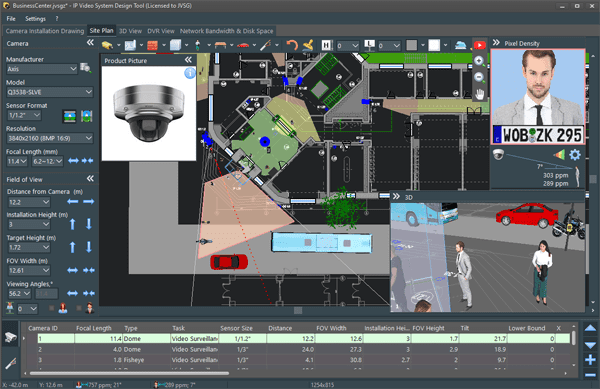
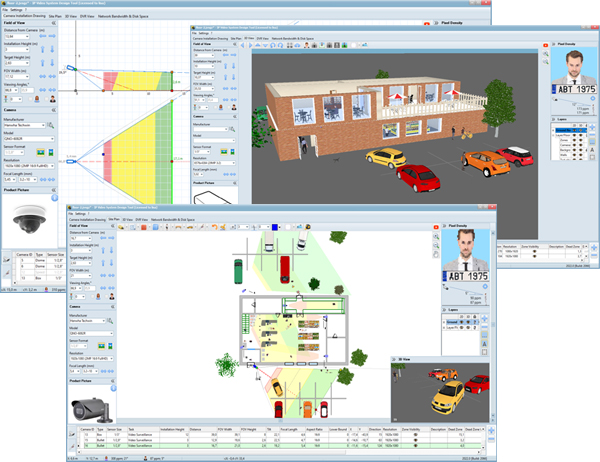
Design professional video surveillance systems faster with IP Video System Design Tool. Create accurate 2D and 3D models of camera coverage and plan your security camera system before installation.
Download IP Video System Design Tool 2026 for Windows.
Latest version: Build 2467 64-bit · Windows 11/10 · 470 MB

Version 2026
- Download version 2026 – build 2605 (64-bit EXE · 470 MB · October 7, 2026).
- Download version 2026 – build 2604 (64-bit EXE · 470 MB · September 30, 2026).
- Download version 2026 – build 2602 (64-bit EXE · 470 MB · September 23, 2026).
- Download version 2026 – build 2467 (64-bit EXE · 471 MB · August 28, 2026).
- Download version 2026 – build 2458 (64-bit EXE · 470 MB · June 5 2026).
Having trouble downloading? Try the alternative download link (build 2605, 64-bit EXE · 470 MB · October 7, 2026).
- Improved AutoCAD DWG export.
- Added customizable 3D models: shelves, stacks, and bookcases.
- Added new 3D models: pallet, sailboat, and yacht.
- Improved performance when working with large projects.
- Compatible with Macs with Apple silicon when running Windows in Parallels Desktop.
- Database of more than 23,000 camera models.
Previous versions
Version 2025 (April 2025 – November 2025)
- Download version 2025.2 – build 2402 (64-bit EXE · 466 MB · November 25, 2025).
- Download version 2025.2 – build 2399 (64-bi EXE · 459 MB · November 17, 2025).
- Download version 2025.2 – build 2395 (64-bit EXE · 459 MB · old digital signature).
- Download version 2025 – build 2388 (32-bit EXE · 459 MB · September 19, 2025).
- License keys purchased in 2024 or 2025 are compatible with Version 2025. You may need to re-enter your license key.
What is new?
- Added a new Bill of Materials (BOM) tab for generating equipment lists and adding them to reports
- Added Bill of Materials export to Microsoft Excel and LibreOffice Calc.
- Added camera layout export to AutoCAD DWG.
- 64-bit architecture delivers up to 30% better performance on large projects and supports significantly larger project files.
- Added bulk replacement of camera models in the Bill of Materials tab.
- Added report export to PowerPoint (.pptx) and HTML, in addition to Microsoft Word (.docx), LibreOffice (.odt), and PDF.
- Added support for IEC/EN 62676-4:2025 (Part 4: Application guidelines).
- 19,000+ cameras in the camera model database.
Available in 25 languages, including English, German, French, Spanish, Portuguese, Italian, Polish, Chinese(中文), Korean (한국어), and Japanese (日本語).
Version 2024 (December 2023 – December 2024)
IP Video System Design Tool 2024 download links (32-bit versions):
- Download Link 2024.0.0.2292 (EXE file, 451 Megabytes, 16th of December 2024).
- Download Link 2024.0.0.2240 (EXE file, 433 Megabytes, 14th of May 2024).
- Download Link 2024.0.0.2202 (EXE file, 415 Megabytes, 8th of January 2024).
- Download Link 2024.0.0.2198 (EXE file, 415 Megabytes, 11th of December 2023).
Features:
- Export to Microsoft Word.
- Added a dark theme for the user interface.
- Added pixel-density visualization for thermal cameras.
- Added symbols for access control and burglar alarm systems.
- Added Report Boundaries to control which part of the site plan is included in PDF reports.
- The program displays the horizontal angle when the user adds a 3D model of a person to the Site Plan.
- Added 3D models of railroad tracks and a passenger train (expert version).
Version 2022 of IP Video System Design Tool (May 2022 – October 2023)
Click the download button below to download IP Video System Design Tool 2022 build 2162 [for Microsoft Windows 11/10/8/7 SP1, 398 Megabytes]
- Download Link 2022.0.0.2162 (EXE file, 398 Megabytes, October 2023).
- To activate your version 2022 or 2024 please use your license key for version 2022 (purchased from Feb/07/2022)
What is new? | How to uninstall? | Video Tutorials | For Mac Users