




JVSG Online is a web-based tool for designing video surveillance systems in 2D and 3D, created for fast video surveillance planning directly in a browser.
Start your CCTV project on a computer, tablet, or smartphone. Upload a site plan, position cameras, review DORI zones, explore the scene in 3D, add installation notes and photos, save the project, and share it with your customers.
JVSG Online is designed for site surveys, quick camera placement, early-stage CCTV planning, and project review without installing software and completely free while in beta.
Launch JVSG Online beta (best in FireFox/Opera/Safari browser)
Warning: Chrome versions 151–154 have a bug affecting IndexedDB, the browser’s internal storage used by this app to autosave projects.
If you use one of these versions, please save your projects manually and regularly: open the menu in the top-right corner and select Export project to file (.jvsgz).
You can open saved .jvsgz files in this app or in IP Video System Design Tool, our Windows software for professional CCTV design.
CCTV Design Software That Works in a Browser
JVSG Online brings professional video surveillance planning to the web.
You can open the application in a browser and start working with a project
from almost any modern device.
It is especially useful when you need to inspect a site, discuss camera
locations with a customer, or quickly prepare a CCTV layout.
No Installation Required
There is no need to download or install a program to start using JVSG Online.
Open the web application in your browser, load a project or create a new one,
and begin planning.
JVSG Online is convenient for:
- Site surveys
- Customer meetings
- Quick CCTV layouts
- Project review
- Work on tablets and smartphones
- Camera placement
Start on Site. Continue with Professional CCTV Design.
JVSG Online gives you everything you need for fast CCTV planning directly in a browser.
Use it on a computer, tablet, or smartphone to upload a site plan, place cameras, check
coverage and DORI zones, review the project in 3D, and add photos and installation notes
during a site survey.
For advanced engineering and complex CCTV projects, open the same .jvsgz project file
in JVSG IP Video System Design Tool.
The professional desktop software provides advanced features for detailed system design,
cable routing, storage calculations, camera documentation, and professional report generation.
JVSG Online makes site surveys and early-stage planning faster, while JVSG IP Video System Design Tool
provides the professional capabilities required to complete detailed CCTV projects.
A Practical Workflow for CCTV Site Surveys
A typical project workflow with JVSG Online can look like this:
- Open JVSG Online on a tablet or smartphone while visiting the site.
-
Load a floor plan, map image, or existing .jvsgz
project file. - Add cameras directly to the plan.
- Check camera fields of view and DORI zones.
- Review the camera layout in 3D.
- Add photos and comments for camera installation points.
- Save the project as a .jvsgz file.
-
Open the same file later in JVSG IP Video System Design Tool for
complete professional design.
This workflow helps connect field work and office-based engineering in one
project format.
2D CCTV Planning and 3D Scene Viewing
JVSG Online allows you to work with a project in 2D and review the scene
in 3D.
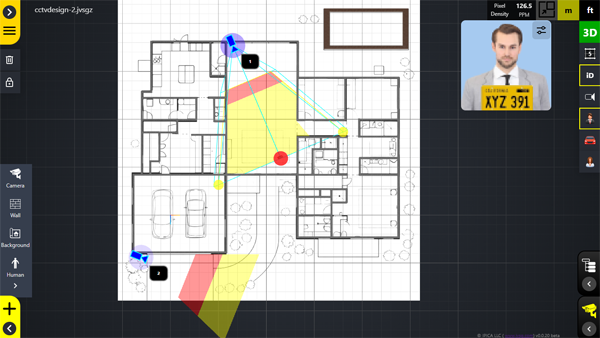
In 2D mode, you can work with a site plan, place cameras, add walls, and
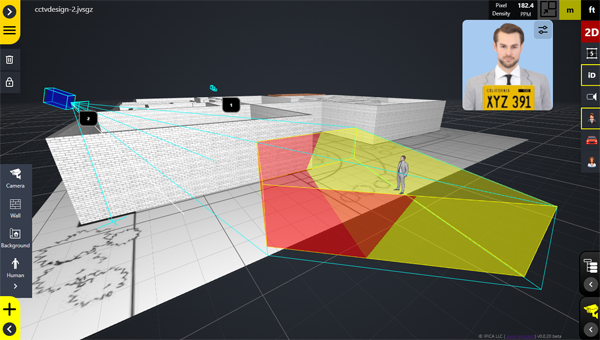
check camera coverage zones. In 3D view, you can better understand how
cameras, walls, people, and scene geometry work together.
2D Editing
Use 2D mode to create or edit the basic CCTV layout:
- Upload a floor plan or background image
- Add walls
- Place cameras
- Add human models
- Adjust camera positions
- Check camera coverage zones
- Review DORI areas on the plan
3D Viewing
Use the 3D view to better understand real-world camera coverage:
- View the project scene in 3D
- See camera coverage in space
- Review walls and obstacles
- Check human models in the scene
- Present the project visually to customers or colleagues
DORI Zones for Video Surveillance Planning
JVSG Online supports DORI zones, helping you understand what each camera
can actually see at different distances.
DORI is commonly used in video surveillance design to describe the level
of detail available in an image:
- Detect
- An object or person can be detected.
- Observe
- General activity can be observed.
- Recognize
- A person or object can be recognized.
- Identify
- A person can be identified with a higher level of detail.
DORI zones help designers, installers, and customers quickly understand
whether a camera position is suitable for the required surveillance task.
Add Photos and Installation Comments on Site
JVSG Online is especially useful during site surveys.
When visiting a customer location, you can use a tablet or smartphone to
review the plan, select camera positions, and add practical installation
information directly to the project.
Document Camera Installation Points
For each camera location, you can add field information such as:
- Installation comments
- Photos of the mounting location
- Notes about obstacles
- Mounting height observations
- Cable routing remarks
- Customer-specific requirements
This helps reduce the gap between the site survey and final project
documentation.
Works with JVSG Desktop Project Files
One of the key advantages of JVSG Online is compatibility with JVSG
desktop project files.
JVSG Online can open and save project files with the
.jvsgz extension. This allows you to move a project
between the browser-based version and IP Video System Design Tool.
Compatible Project Workflow
You can:
- Open an existing .jvsgz project in JVSG Online
- Edit the project in a browser
- Save the updated .jvsgz file
- Open the same file in JVSG IP Video System Design Tool
- Continue detailed CCTV design in the desktop software
This makes JVSG Online a practical companion for existing JVSG users.
Your Files Stay with You
During the beta version, JVSG Online does not require cloud storage for
project files.
You can open and save project files locally. This means your project files
stay under your control, which can be important for security-sensitive
sites and professional CCTV design work.
No Cloud Required
With the local project file workflow:
- You control where project files are stored
- You can send files manually to colleagues or customers
- You can archive projects using your own file system
- You can continue working with the same files in JVSG Desktop
Free During Beta
JVSG Online is currently planned as a free beta product.
During the beta period, users will be able to test the web application,
try the browser-based CCTV planning workflow, and share feedback with the
JVSG team.
Help Shape the Future of JVSG Online
The beta version is an important step in the development of JVSG Online.
Feedback from real CCTV designers, installers, consultants, and existing
JVSG users will help us improve the product before the public release.
We are especially interested in feedback about:
- Site survey workflow
- Camera placement
- 2D editing
- 3D viewing
- DORI zone visualization
- Mobile and tablet usability
- Compatibility with JVSG desktop files
- Photos and installation comments
Who Is JVSG Online For?
JVSG Online is designed for professionals involved in video surveillance
planning and CCTV system design.
It can be useful for:
- CCTV installers
- Security system integrators
- Video surveillance consultants
- Low-voltage designers
- Security engineers
- Sales engineers
- Project managers
- Existing users of JVSG IP Video System Design Tool
For CCTV Installers
Use JVSG Online on site to quickly review the floor plan, place cameras,
check coverage, and add installation notes.
For Security Consultants
Prepare early-stage layouts, discuss camera positions with customers, and
review DORI zones before creating a detailed design.
For Existing JVSG Users
Use JVSG Online as a browser-based companion to the desktop software.
Start or update a project in the field, then continue detailed work in
IP Video System Design Tool.
JVSG Online and IP Video System Design Tool
JVSG Online is ideal for quick access, site surveys, project review, and
browser-based editing. The desktop product remains the professional
environment for detailed CCTV design, advanced planning, cable routing,
calculations, and report generation.
Together, they create a more flexible workflow for professional video
surveillance design.
Try JVSG Online Beta
JVSG Online makes it easier to start, review, and update CCTV projects
from almost anywhere.
Use it in a browser. Work on a computer, tablet, or smartphone. Add cameras,
walls, people, DORI zones, photos, and installation comments. Save your
project as a .jvsgz file and continue detailed work later
in JVSG IP Video System Design Tool.
Start your next CCTV design project in the browser or download our professional Desktop software for Windows.
If you were looking for JVSG CCTV lens calculator, it is at this link.