


case study for cctv installers
case study for cctv sales engineers
IPICA ratings
cctv lens calculator
Online CCTV Bandwidth and Storage Space Calculator
  Youtube Channel Linkedin Twitter  
 

Affiliate Program – “Drive Traffic”

Important: the affiliate program is in the process of modification at the moment. Please contact us for details.

We reward other website owners and bloggers for linking to our site.

We pay from you from 15% of every our sale depending on the number of sales you generated. We offer higher commission for web-site owners who have their video surveillance oriented community.

How does the DRIVE TRAFFIC program work?

1. Place a special link with your affiliate ID on your Web page. It can be a Text Link, Screenshot, Banner or Button.

2. When surfers click on the link on your site, they are sent to our site or to the order form via a redirection. To the surfer, it appears as a direct link. At this point, the system sets a cookie with the surfer.

3. The surfers continue through our site, select products to download. Even if they don’t order just then, you will still receive credit for the order 52 weeks down the road. Because we’ve tracked where a customer first heard about the product, we give credit to you no matter when or where the customer finally decides to buy!

4. Each month you receive a commission check. It’s that easy!


Become a JVSG Affiliate Today!
Becoming an affiliate is free and takes only 5-10 minutes. First you would sign up for a Free PayPro Global Affiliate account.

1.  You need to create an affiliate account at our e-commerce provider PayProGlobal.

2.  Then, please follow the instructions.

F.A.Q. Frequent Affiliate-Related Questions

Is Becoming An Affliate Free?
Yes. There are no startup charges or membership fees or anything of the sort related with becoming a JVSG affiliate. Affiliation is 100% free of charge. Plus, the more sales you generate from your links, the more income you will receive.

How will I know when I have made a sale?

Anytime you make a sale you will receive an email containing information about the sale. This allows you to keep track of your sales on a daily basis. The amount shown in the order email is the total price. You just earned 15-30% of that figure.

Do I have to provide support after a sale?
We will take care of the customer should they require support. We give the same award-winning service to our affiliates as we do to our customers. After you generate a lead (a customer clicks your link), we will handle everything else from sales to ordering to support. All you do is sit back and enjoy the automated income, you never have to worry about that customer again, we take it from there.

Can I Promote Through My Newsletter Or Online Magazine?
Advanced bloggers, journalists, or internet marketers who wish to use their newsletter or e-zine to earn commission are more than welcomed. We will work with you in any way possible to provide custom graphics, text or content for your publication that uses your affiliate link.

PPC/SEO Policy

  • You will not promote coupons or discounted products using paid search without JVSG permission or in the following ways in the paid search space: you are able to bid on branded key words however you will not include any mention of a discounted price or coupon code in your ad copy or if you bid on non-branded keywords or use an exact match and include a second keyword (JVSG Coupon) you are able to use the discounted price and coupon code in your ad copy.
  • You will comply with all applicable laws and regulations, whether foreign, federal, state or local, applicable to the activities performed hereunder, specifically including any EU data protection laws.
  • You will comply with JVSG policies regarding spam and privacy.
  • You will not use any adware, scumware, Trojan horse, malware, and/or the like.
  • Purchase or bid for placement of “jvsg.com”, “ip video system design tool”, “cctv design tool” or any variation or misspelling thereof, within any third party search engine or portal is prohibited.
  • During the term of or after the expiration or termination of this Agreement, use of any mark, name or domain name of any type which is confusingly similar to “jvsg” or other JVSG trademarks is prohibited.

CCTV and Security Camera Glossary: Angle of View, Focal Length, Field of View, Camera Sensor Format

For effective usage of our CCTV design software for camera lens and network bandwidth and HDD space calculation you should understand all following CCTV installation parameters:

IP Video System Design Tool Software

download now

Angle of View - The scene angle that a video camera lens can show on the monitor, like Diagonal Angle, Horizontal Angle and Vertical Angle, usually described in degree.

Aspect Ratio - The ratio of the vertical to the horizontal image size; 4:3 is the PAL standard.

BandwidthThe capacity of the transmission medium stated in bits per second or as a frequency. Or, the amount of data that can be transmitted in a fixed amount of time. For digital devices, the bandwidth is usually expressed in bits per second (bps) or bytes per second.

Bit - Abbreviated with small “b”. Binary Digit. The smallest unit of data in a computer.

bps - Bits Per Second is the unit used for measuring line speed, the number of information units transmitted per second.

Byte - Abbreviated with capital “B”. A unit of data that is eight bits long and is used by most computers to represent a character such as a letter, number or symbol.

Camera format (Sensor Size) - Video camera’s CCD chips format;  1/4″,  1/3″, 2/3″, 1″ etc.

Camera Sensor – Video image sensor. CCD or C-MOS chip.

CCD - Charge Coupled Device. A video image sensor chip.

CCTV (Closed Circuit Television) - Is a Television system that sends a signal to one or more monitors rather than broadcasting over a public network, hence closed-circuit. A standard CCTV system will normally include a CCTV camera (for capturing video), transmitters and receivers (to transfer the video from the source to where it is recorded), a recording system (for video playback), and a monitor (for video monitoring). CCTV systems are primarily used for security purposes inside and outside buildings.

CMOS - Complementary – Metal Oxide Semiconductor. A video image sensor chip that produces much lower quality picture than CCD chip.

DVR - Digital Video Recorder; records video pictures digitally.

Electronic Shutter - Compensates for moderate light changes in indoor applications without the use of auto iris lenses.

Field Of View (FOV) - The width, height or diameter of a scene to be monitored. Field of View usually determined by the focal length of a lens, the sensor format and the distance to the objects.

Focal Length (FL) - The distance from the center of a lens to the focal point (sensor). The longer the focal length, the narrower is the angle of view.

Frame - A whole video image; is composed of two interlaced fields. A CCD chip produces 30 frames per second at NTSC system and 25 frames at PAL.

Gigabyte (GB) – 1024 Megabyte = 1073741824 Bytes

IP - Internet Protocol. A set of rules to send and receive messages at the Internet address level.

IP CCTV (IP Video) - Internet Protocol Closed Circuit Television

Iris - An adjustable opto-mechanical aperture built into a camera that controls the amount of lights coming through the lens.

JPEG - Joint Photographic Experts Group. A graphic image file or a image compression algorithm.

Kilobyte ( Kb) – 1024 Bytes

Kbps - Kilobits per second. A measure of bandwidth.

LAN - Local Area Network. A group of computers and associated devices that share a common communications line.

Megabyte (MB) – Megabyte = 1024 Kilobyte = 1048576 Bytes

Mbps – Megabits per second. A measure of bandwidth.

MPEG - Moving Picture Experts Group. A standard for a digital video & audio compression.

NTSC - National Television System Committee; formulates standards for American colour television system. NTSC system has 525 horizontal scan lines and 30 frames per second.

PAL - Phase Alternating Line system. A colour television system used in Europe, Australia, parts of Africa and the Middle East. It has 625 horizontal scan lines and 25 frames per second.

PanRotating or scanning a camera side ways to view an area in a horizontal direction.

Pan and Tilt - A Camera mounting device that allows movement in both side ways and up or down.

Server - A computer program that provides services to other computer programs in the same or other computers. Or, the computer that a server program runs.

Switcher - A device that allows the video signals from multiple cameras to be displayed on a monitor, or recorded on a VCR one at a time in sequence.

TCP - Transmission Control Protocol. A set of rules to exchange messages with other Internet points at the information packet level.

Web Camera - A CCTV Camera with built-in web server computer.

CCTV Lens Angle

How to choose a proper CCTV Lens for a given angle?

Different CCTV lens sizes can change the viewing angle of a security camera. Typically angle of view or CCTV lens angle can be expressed in  Horizontal (HFOV),  Vertical, or Diagonal. Angle of view at a given distance depends upon the focal-length of the lens and CCD Sensor size (1/6″, 1/4″, 1/3″, 1/2″ or 1″).  Smaller focal lengths give a wider angle of view.In the past you would use a tables like this:

Focal Length 1/4″, Lens Angle
1/3″ Lens Angle
1/3″, Width  at 10m
4 44 62 10.9 m
6 30 44 7.7 m
8 22 33 5.9 m

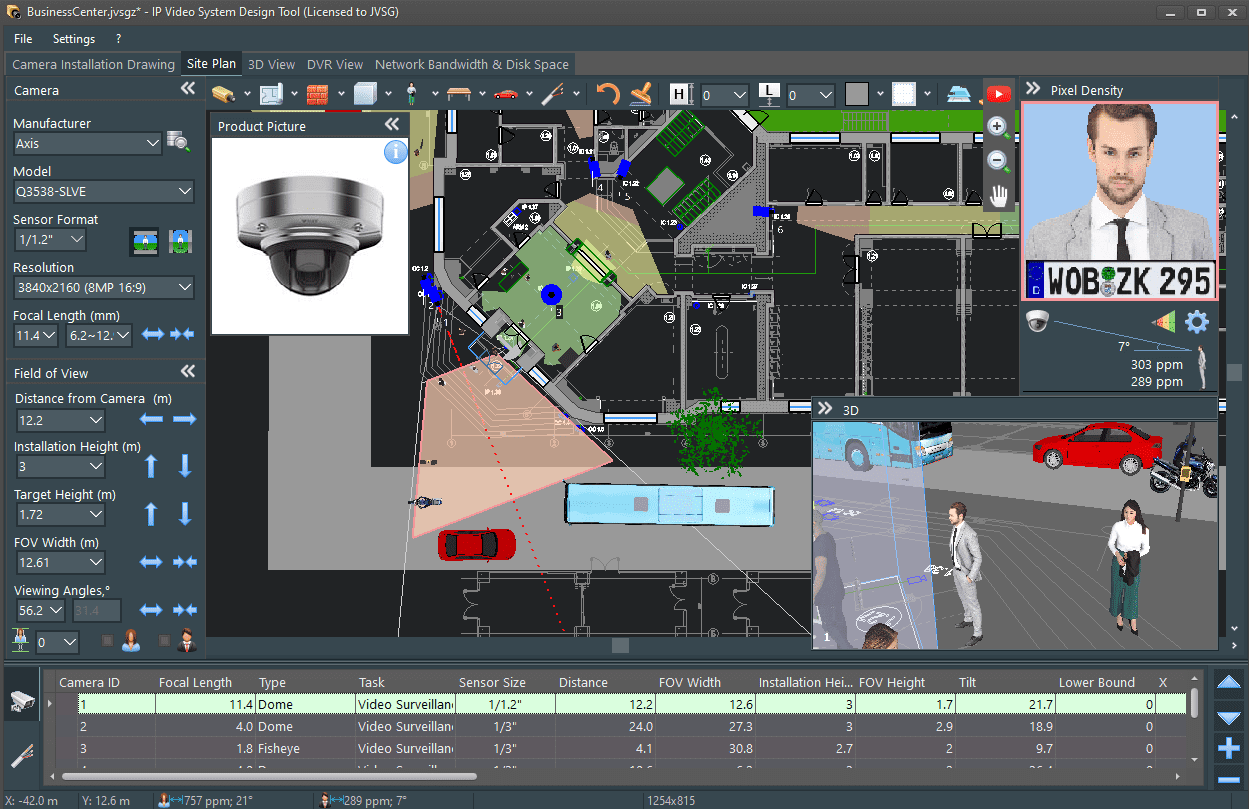
Nowadays there is an easy way to find proper CCTV lens and proper camera locations. You can use our  CCTV design tools to visualize CCTV lens angles and see how modification of any parameter affects the whole design.

CCTV Lens Angle Software

CCTV Lens Angle Software

download now

When choosing the lens focal length you need to consider the purpose of the video surveillance system, general observation to detect activity/movement, or the ability of facial identification. Also dependent on the purpose is the resolution of the security camera.

Download CCTV Design Tool software , Use online lens calculator,   See comments from CCTV designers and installers

download now