





Axis Site Designer vs IP Video System Design Tool: Which CCTV Design Software Is Right for You?
Author: Lisa Yashina, Security Industry Expert
Published: June 15, 2026
Both products help plan surveillance systems, estimate storage requirements, and validate camera placement.
However, they were designed with different goals in mind.
Axis Site Designer focuses on helping users build surveillance systems around the Axis ecosystem.
IP Video System Design Tool focuses on professional CCTV engineering across multiple manufacturers and project types.
This article compares both platforms to help security consultants, integrators, and installers choose the right solution.
Overview of Both CCTV Design Solutions
Axis Site Designer is a free planning tool developed by Axis Communications.
It helps users select Axis cameras, calculate storage, estimate bandwidth requirements, and create surveillance system designs based on Axis products.
IP Video System Design Tool is a professional CCTV design application developed by JVSG.
The software supports thousands of camera models from multiple manufacturers and provides advanced tools for surveillance validation, cable planning, documentation, and 3D visualization.
Where and How Each Tool Works
Axis Site Designer is a cloud-based solution designed around the Axis ecosystem.
Users can quickly create projects without maintaining a complex local software environment.
IP Video System Design Tool is a desktop application that runs locally on Windows.
It can also be deployed in environments where internet access is restricted or unavailable.
| Feature | Axis Site Designer | IP Video System Design Tool |
|---|---|---|
| Primary focus | Axis ecosystem planning | Professional multi-vendor CCTV design |
| Deployment | Web-based | Desktop application |
| Offline work | Limited | Full offline operation |
| Camera database | Axis products | 22,700+ cameras, 200+ manufacturers |
Design Flexibility Across Multiple Manufacturers
One of the biggest differences between the two solutions is manufacturer support.
Axis Site Designer is optimized for Axis cameras and related Axis devices.
For organizations that standardize on Axis equipment, this can simplify the design process.
IP Video System Design Tool supports more than 22,700 camera models from over 200 manufacturers.
This allows consultants and integrators to compare multiple vendors within the same project.
JVSG vs Axis Site Designer
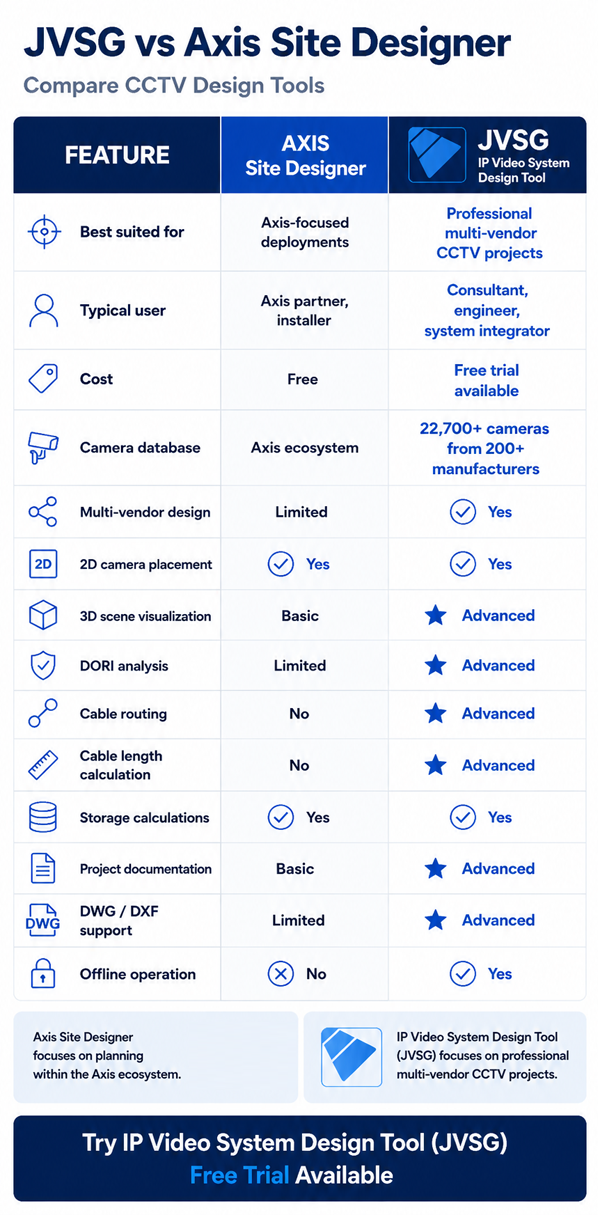
| Feature | Axis Site Designer | IP Video System Design Tool |
|---|---|---|
| Best suited for | Axis-focused deployments | Professional multi-vendor CCTV projects |
| Typical user | Axis partner, installer | Consultant, engineer, system integrator |
| Cost | Free | Free trial available |
| Camera database | Axis ecosystem | 22,700+ cameras from 200+ manufacturers |
| Multi-vendor design | Limited | Yes |
| 2D camera placement | Yes | Yes |
| 3D scene visualization | Basic | Advanced |
| DORI analysis | Limited | Advanced |
| Cable routing | No | Advanced |
| Cable length calculation | No | Advanced |
| Storage calculations | Yes | Yes |
| Project documentation | Basic | Advanced |
| DWG / DXF support | Limited | Advanced |
| Offline operation | No | Yes |
Coverage Validation and DORI Analysis
Both tools help designers estimate surveillance coverage.
However, IP Video System Design Tool places greater emphasis on surveillance validation and engineering analysis.
- DORI calculations
- Pixel density visualization
- 3D Visualization
- IEC 62676-4:2025 workflow support
For projects where compliance and evidence quality are critical, these capabilities can be particularly valuable.
3D Visualization
Perhaps the most significant difference is 3D simulation.
Axis Site Designer focuses primarily on system planning and equipment selection.
IP Video System Design Tool includes advanced 3D visualization capabilities that allow users to:
- Create realistic environments
- Place obstacles and structures
- Visualize blind spots
- Simulate camera views
- Demonstrate coverage to customers
For consultants and system integrators, 3D presentations can help communicate surveillance performance before installation begins.
Cable Planning and Infrastructure Design
Large surveillance projects require more than camera placement.
IP Video System Design Tool includes dedicated tools for cable routing, cable length calculation, infrastructure estimation, and material planning.
This can improve budgeting accuracy and reduce installation surprises.
Project Documentation
Both products provide project documentation capabilities.
IP Video System Design Tool additionally supports exporting documentation in professional engineering formats including PDF, Microsoft Word (DOC), XLS, DWG, DXF, HTML, and PPTX.
This can be particularly useful for consultants preparing customer proposals or engineering documentation packages.
Who Should Use Axis Site Designer?
- Organizations standardized on Axis equipment
- Installers working primarily with Axis cameras
- Users looking for a straightforward planning tool
- Projects focused on equipment selection and sizing
Who Should Use IP Video System Design Tool?
- Consultants and system integrators
- Multi-vendor projects
- Enterprise surveillance systems
- Critical infrastructure projects
- Projects requiring DORI validation
- Projects requiring realistic 3D visualization
- Designers needing cable routing and engineering documentation
Conclusion
Axis Site Designer is an excellent planning solution for organizations working within the Axis ecosystem.
IP Video System Design Tool addresses a broader range of CCTV engineering requirements, including multi-vendor design, cable planning, documentation, and 3D visualization.
The best choice ultimately depends on your project requirements, workflow, and preferred design methodology.
Download the free trial and see the difference on your next project.