



- IPVM Camera Calculator (Cloud-Based)
- System Surveyor
- VideoCAD
- CCTV Design Tool (Cloud-Based)
- Vendor-Developed Tools (Brand-Specific):
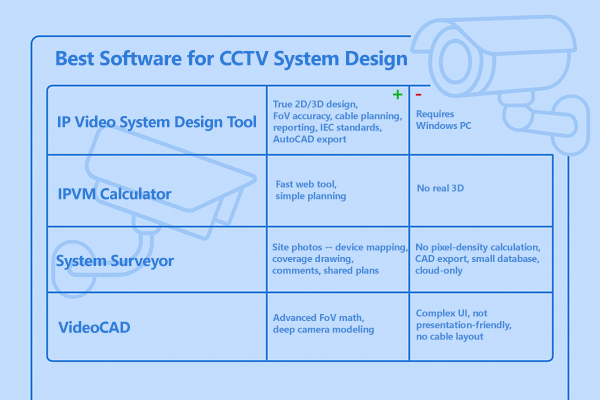
- IP Video System Design Tool
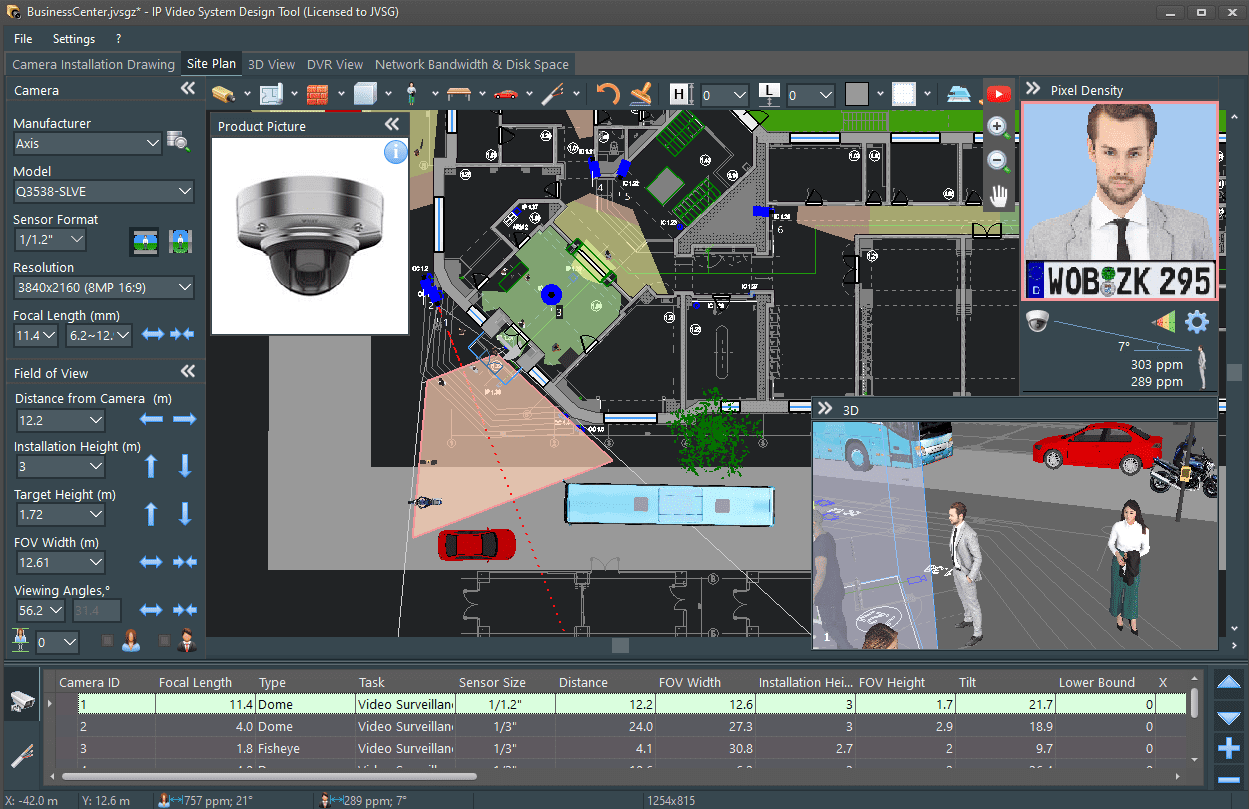
- Accurate 2D & 3D camera design — realistic scene modeling for correct coverage planning
- Precise FoV simulation — focal length, tilt, height, resolution, sensor size, pixel density zones
- Visual client walkthrough & professional presentation — demonstrate to the customer exactly what the camera will see
- Automatic Bill of Materials (BOM) & reports — ready for proposals and tenders
- Cable path planning & cable length calculation — plan routing, avoid installation surprises, and optimize materials cost
- Compliance: IEC 62676-4:2025 (OODPCVS), IEC 62676-4:2015 (DORI) supported supported
- Bandwidth & storage calculation — prediction of network load and archive size
- Extensive multi-vendor camera database (more than 20 000 cameras by 2025)
- Export to AutoCAD & other formats — DWG/DXF/DWF/PDF/DOC/ODT/PPTX/HTML/XLS
- Scales from small retail & cafes to airports & smart-city projects — easy to use for beginners, powerful for enterprise and mission-critical sites (airports, cities, critical infrastructure)
- Requires Windows PC or Mac with Parallels Desktop with hardware acceleration for optimal 3D performance.
- IPVM Camera Calculator
- Fast browser interface — works without installation
- Large vendor camera database
- Good for initial project sketches and rough coverage planning
- Helps compare lenses & basic viewing angles before detailed design
- Effective for early-stage proposals where speed matters more than precision
- No full 3D modelling or realistic scene simulation
- Not designed for detailed engineering packages or tender-grade documentation
- System Surveyor
- Tablet/mobile-friendly
- Capture photos on site & attach them to camera markers
- Draw coverage areas during walkthrough
- Add notes, cable routes, device annotations
- Collaborative design with teams and customers
- Cloud sharing for project stakeholders
- Good for organizing multi-device security systems (access control, alarms, IoT)
- Helps sales teams visually explain design decisions during onsite meetings
- VideoCAD
- Powerful technical camera modelling
- Lens distortion simulation
- Advanced mathematical parameters
- Useful for academic study, lens science & specialized simulation cases
- Good for users comfortable with complex engineering settings
- Learning curve & interface complexity
- Less presentation-oriented for clients
- No cables
- CCTV Design Tool (Cloud-Based)
- Works without Windows installation
- Simple online FoV preview
- Convenient for quick camera quantity estimation in lightweight scenarios
- No installation needed — accessible anywhere
- Cloud = potential data exposure vector
- Dependent on internet
- Less engineering depth compared to professional desktop tools
- Vendor-Provided Tools (Brand-Specific)
Best for: Professional CCTV engineers, system integrators, consultants, enterprise & government projects — and also perfectly suitable for small businesses such as cafes, retail stores, offices, and private facilities thanks to its intuitive workflow and ease of use.
A dedicated engineering tool built specifically for video-surveillance system planning.
Key strengths:

Why it stands out:
Deepest professional functionality, realistic modelling, polished workflows for serious security engineering.
Considerations:
Best for: Quick concept planning, early camera placement, vendor comparison, cloud access
A lightweight web-based estimator for initial CCTV layouts.
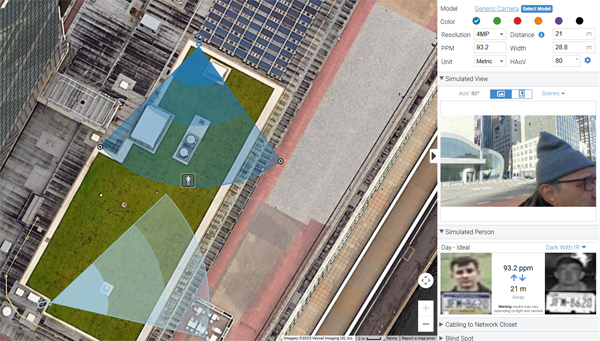
Strengths:
Why it’s useful:
Ideal tool for quick feasibility checks and “first look” concepts during planning discussions.
Considerations:
Great for feasibility and quick “first look” designs. Great supporting tool for conceptual layouts — but final design, 3D workflow would be an advantage.
Best for: Site surveys, field work, customer collaboration, physical asset mapping
System Surveyor is a field-first design assistant, suitable for on-site planning.
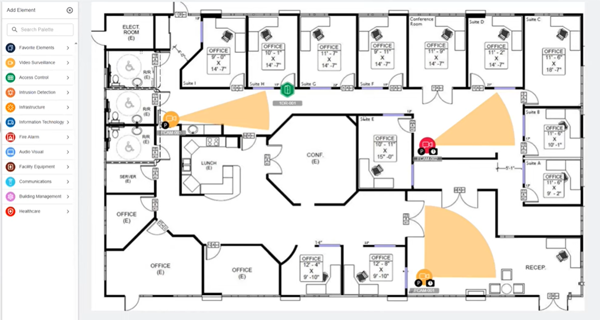
Strengths:
Purpose:
Helps gather information & build initial plan during site visit .
Consideration:
Not intended to replace full engineering design — final precise modelling typically done in dedicated software.
Best for: Technical specialists who prefer extremely detailed engineering settings
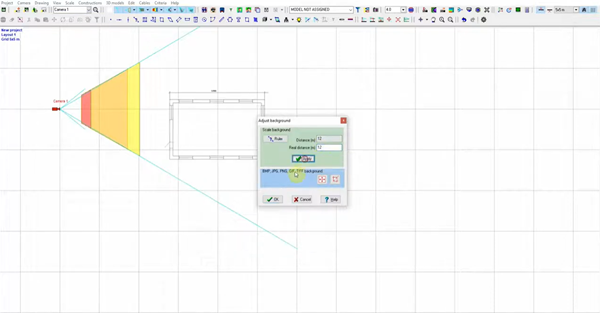
Strengths:
Consideration:
Good as a niche engineering tool for highly technical users. Strong mathematics engine — requires technical background to use fully.
Best for: Users who must work in browser / Linux environments
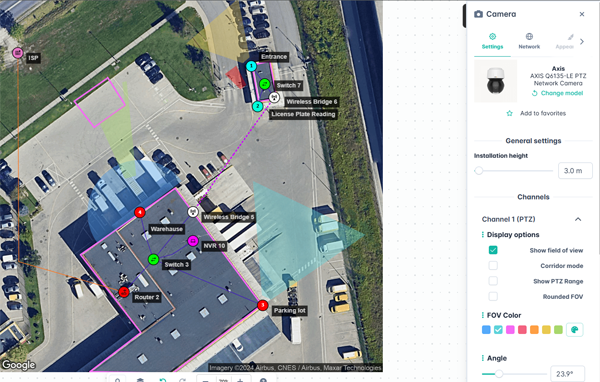
Strengths:
Important note:
Surveillance system drawings, camera positions and FoV layouts are sensitive security information. Cloud tools always introduce confidentiality & compliance risks.
Limitations:
Note:
Good fallback when Windows software, use with caution if your camera layouts are confidential information.
Axis Site Designer
Best for: Projects built exclusively on Axis hardware and ecosystem components
A vendor-focused planning tool designed to help integrators configure Axis-based surveillance systems quickly and accurately.
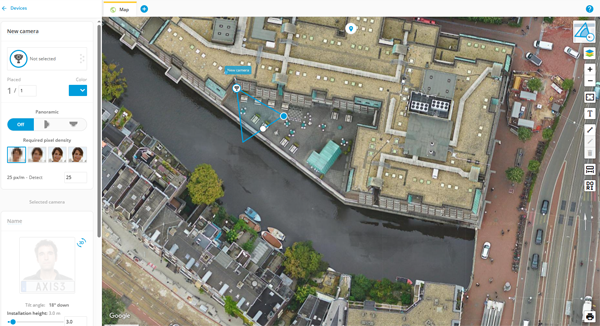
Strengths:
- Clean, intuitive interface for camera & accessory selection
- Product recommendation engine with Axis device database
- Integration with Axis analytics and VMS configuration logic
- Supports accessory planning (mounts, brackets, PoE, cabling considerations)
- Useful for building end-to-end Axis ecosystems, especially when standardizing on branded devices
Why it’s useful:
Streamlines equipment selection and preliminary coverage planning when deploying Axis devices in small and medium-scale integrated systems
Consideration:
- Designed for single-brand deployments only
- No full 3D environment or advanced multi-scenario FoV simulation
- Engineering-grade design, pixel density validation, and multi-vendor comparison require a dedicated system design platform
Good companion tool for Axis-centric projects and hardware configuration — best used alongside professional multi-vendor CCTV design software for full engineering accuracy.
Keenfinity (Bosch) DesignHub
Best for: Projects using Bosch cameras and equipment — designed to plan, configure, and manage Bosch surveillance systems with built-in analytics and sensors.
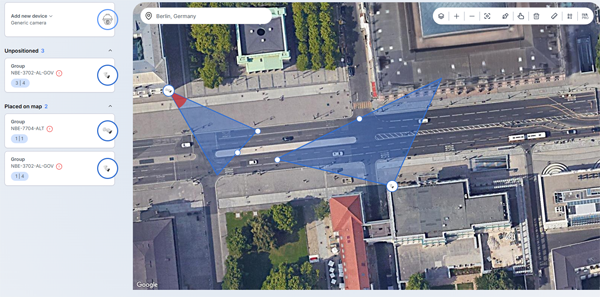
Strengths:
- Native support for Bosch cameras, analytics, and intelligent detection functions
- Built-in storage and bandwidth estimation for Bosch recording solutions
- QR-based workflow enabling smooth project handoff to installation teams
- Convenient for field configuration, device alignment, and validation during setup
- Helpful for standardizing Bosch environments across medium-to-large deployments
Why it’s useful:
Streamlines Bosch system planning and commissioning, particularly where Bosch intelligent analytics and device-level configuration are key requirements.
Consideration:
- Designed for Bosch-only environments — not suitable for multi-vendor architecture planning
- Does not provide advanced 3D camera visualization or engineering-level FoV simulation
- Final system design, security documentation, and multi-brand system validation require dedicated CCTV engineering software
A practical tool for Bosch integrators and commissioning teams — best paired with a professional multi-vendor CCTV design platform for complete engineering, tender-level documentation, and cross-system accuracy.
Avigilon System Design Tool
Best for: Projects using Avigilon cameras
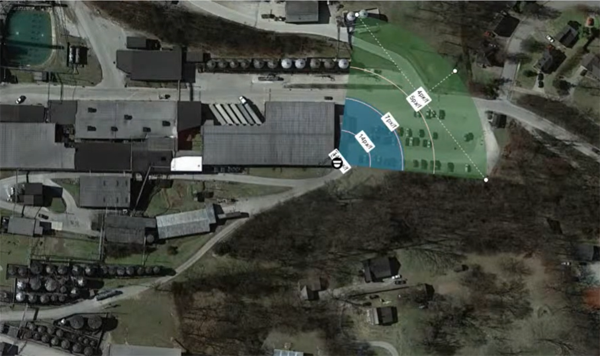
Strengths:
- Accurate server and VMS sizing for Avigilon Control Center
- Camera model selection with recording and storage estimation
- Hardware recommendation engine tailored to Avigilon architectures
- Useful for designing high-performance analytics deployments with Avigilon AI-powered devices
- Helps standardize enterprise installations using a single manufacturer ecosystem
Why it’s useful:
Supports integrators in specifying the correct Avigilon hardware and server infrastructure for medium-to-large enterprise systems where Avigilon is the defined standard.
Consideration:
- Avigilon-only tool — does not support mixed-vendor environments
- Does not provide 2D/3D FoV visualization or pixel-density simulation for real-world coverage validation
- Engineering-grade multi-brand system modelling and tender documentation require a dedicated CCTV design platform
A strong resource for planning Avigilon VMS and compute infrastructure — best used together with professional 2D/3D surveillance design software when projects need coverage accuracy, standards compliance, and cross-vendor flexibility.
Hikvision Design Tool
Best for: Projects using Hikvision cameras and NVRs — a simple tool for planning layouts and selecting devices within the Hikvision ecosystem.
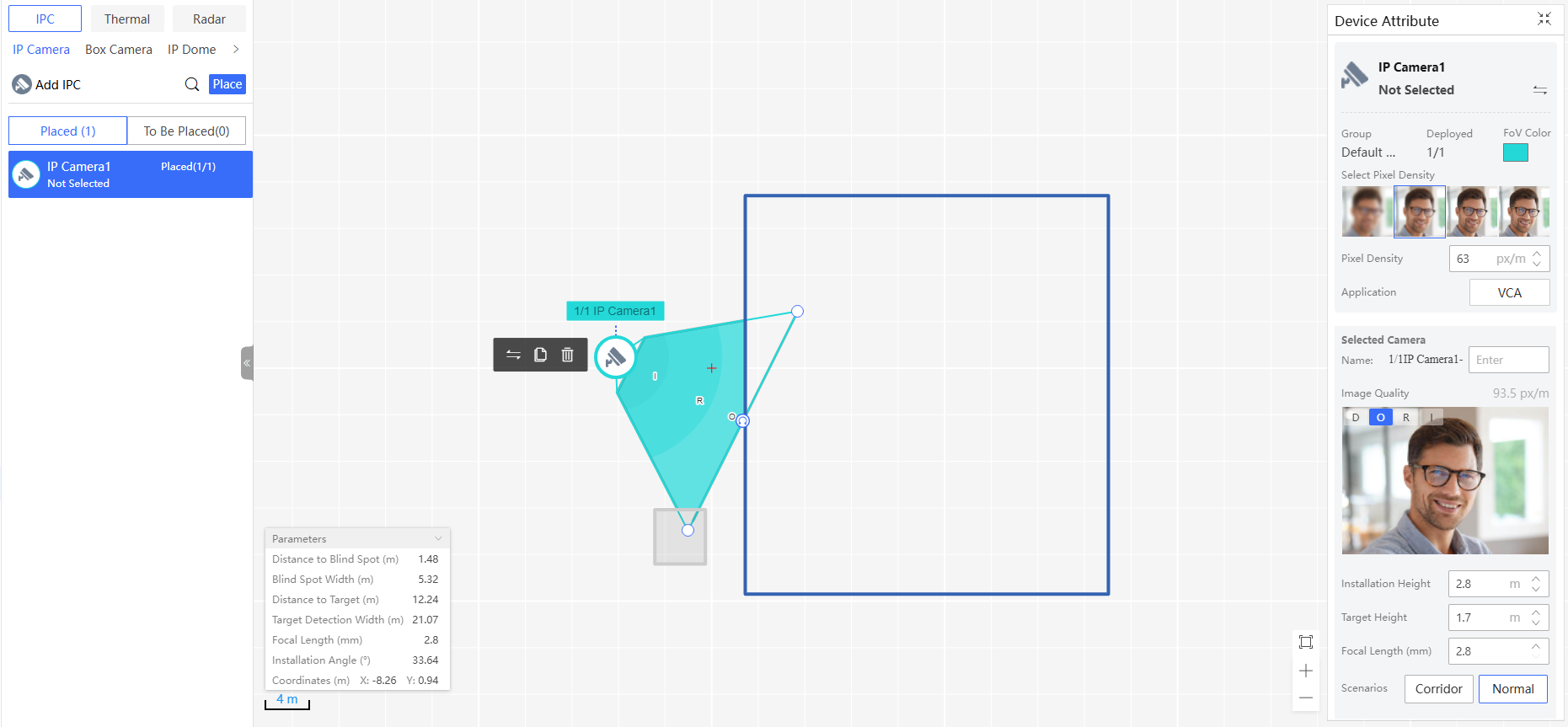
Strengths:
- Simple FoV visualization and camera placement on floorplans
- Automatic pairing of cameras and recorders for Hikvision systems
- Bandwidth & storage calculator aligned with Hikvision recording profiles
- Convenient for entry-level surveillance projects and quick device matching
- Helps standardize deployments in Hikvision-only environments
Why it’s useful:
A helpful starting point for installers and small businesses deploying Hikvision systems, providing quick sizing and planning tools inside a familiar ecosystem.
Consideration:
- Brand-locked — not designed for multi-vendor projects or open architecture designs
- Basic coverage approximation only — no advanced 2D/3D FoV modelling
- Engineering-grade planning, tender drawings, and performance verification require professional CCTV design software
A convenient tool for planning Hikvision-only installations and estimating storage/network needs — best used together with specialized design software for accurate field-of-view analysis, compliance, and professional deliverables.
Dahua Design Tool
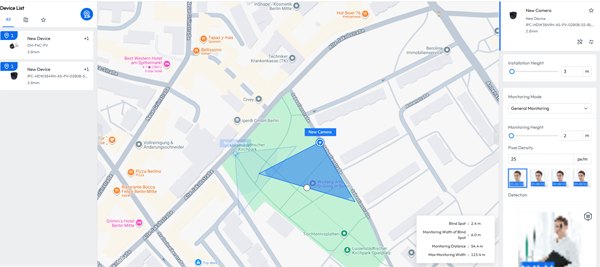
Best for: Dahua CCTV projects — for simple layout planning and device selection.
Strengths:
- Quick matching of Dahua cameras, NVRs, and accessories
- Basic camera placement and simple coverage visualization
- Bandwidth & storage calculator aligned with Dahua encoding settings
- Useful for small and cost-efficient deployments within a single manufacturer ecosystem
- Helps streamline equipment selection for Dahua-centric installers
Why it’s useful:
A practical tool for quick configuration and quoting in entry-level and budget sensitive CCTV projects where Dahua hardware is already chosen.
Consideration:
- Designed exclusively for Dahua-only systems — no support for multi-vendor planning
- Basic micro-layout functionality — no advanced 2D/3D FoV simulation
- Not intended for engineering-grade planning, bid packages, or standards-driven design workflows
- Professional coverage validation and documentation require specialized CCTV design software
A convenient companion tool for Dahua system selection and basic planning — ideally paired with full-featured professional design software when precision, multi-vendor flexibility, and tender-level engineering deliverables are required.